
Digitizing PDF invoices or automatic entry: A guide for companies 2026
In short (TL;DR)
Bilnex has added an AI-based digitization solution for automatic entry of PDF invoices! Manually copying data from PDF purchase invoices and entering them into the accounting system is one of the most time-consuming activities on an accountant's desk. Bilnex's free solution for digitizing PDF invoices uses the latest generation of artificial intelligence (AI) that identifies all the necessary data in seconds. The system learns from your corrections in real time, eliminating routine manual work and automatically importing data into your accounting software. Just the way you want it.
Although e-invoices are the fastest way to settle invoices, every company still receives purchase invoices in PDF format. For a small business manager or accountant, this means a routine and tedious “data entry” role: hours are spent every month retyping invoice numbers, amounts, VAT percentages, long IBAN codes, and supplier details.
Manual data entry is not only time-consuming, but also financially risky. One wrong digit in a reference or account number can mean incorrect payments, confusion with suppliers, and hours wasted chasing down errors.
Bilnex's AI-based digitizer takes over this routine and responsible work completely. And it's completely free.
How is old-school digitization different from new-generation AI?
Traditional invoice digitization (often simply called OCR technology) is based on rigid templates. This means that the system has to be taught that “for this supplier, the invoice number is in the top right corner and the amount is in the bottom left.” If the supplier changes the design of their invoice by even one centimeter, the old-school system can crash and misidentify the data.
Bilnex uses the latest generation of artificial intelligence and machine learning. This means that the AI reads and understands the bill exactly like a human:
- AI detects context. He understands what “total”, “amount”, “net” or “VAT” is, regardless of where it is written on the page.
- AI can read invoices in different languages.
- AI adapts in real time, If you correct any information in a field, the system remembers it and applies this knowledge completely independently the next time it identifies an invoice from the same supplier.
How much does manually entering invoices actually cost you?
We are used to thinking that manually typing invoices into the bank or accounting department is “free” because we do it ourselves on the run or have our monthly paid employee do it. However, the math tells a different story.
If your company receives, for example, 30 PDF purchase invoices per month and it takes an average of 5–7 minutes to manually enter, check, and copy each invoice to the bank, you are spending a month purely on data entry. about 3 hours of productive time. Multiply this time by your hourly rate or employee salary. Digitization does this work in seconds, which means the service pays for itself with the first few invoices.
Legal side: Does the digitized invoice meet the requirements?
One of the most common fears that entrepreneurs have concerns the destruction of paper and PDFs: „"Can I delete the original PDF invoice once it's entered into the system?"“ Yes, you can. According to the Accounting Act, the original documents must be preserved. 7 years, but the law does not require you to keep them in their original form. It is important that the document to be stored (in digitized form in Bilnex) is readable, reliable and allows the content of the transaction to be identified. Digitizing a PDF and storing it in the cloud is a completely correct and secure way to keep an archive.
Frequently asked questions about digitizing PDF invoices
How to activate PDF invoice digitization in Bilnex?
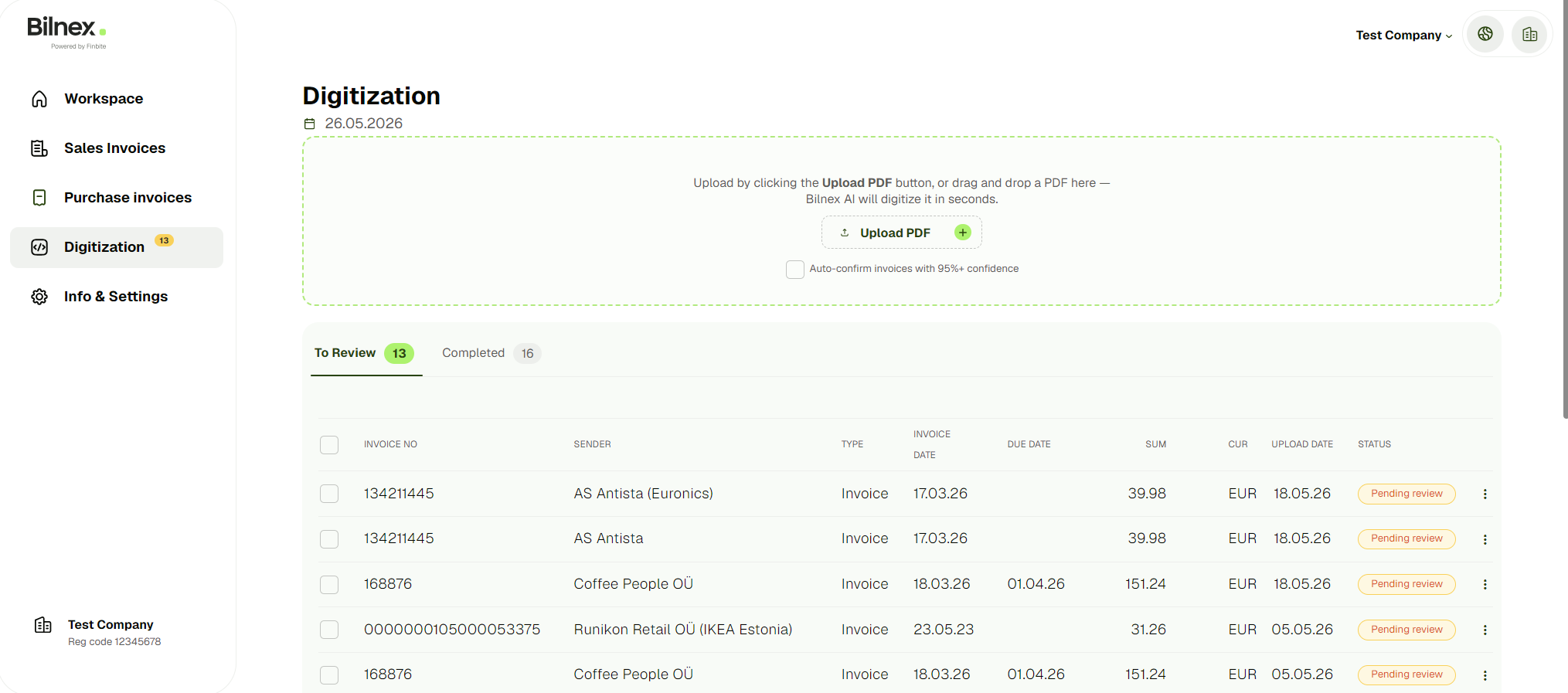
In the Bilnex environment, there is no need to separately configure, order, or activate the digitization service with long contracts. The functionality is immediately ready for use by all users. Simply select the option “ from the left side menu of the Bilnex platform“Digitization” and you can immediately upload your first purchase invoice to the system.
What documents can be digitized in the Bilnex.io environment?
The system is currently optimized to digitize PDF invoices in seconds. Since companies have many expenses that arise on the go (e.g. fuel receipts, taxi bills, restaurant receipts), our development team is actively working on the next update - automatic AI digitization of purchase receipts and paper-based receipts will soon be added to the platform. The current digitization solution can also recognize information from receipts, in the future we will also add expense report capabilities for further processing of receipts.
How high quality and accurate is Bilnex digitization?
Thanks to intelligent artificial intelligence, the accuracy of data recognition is extremely high from day one. However, the main strength of the system is your company-specific learning ability. If the system makes a mistake with a supplier the first time and you manually correct it, the machine remembers your preference in real time. When you upload a PDF invoice from the same supplier the next month, these corrections will already be applied automatically. The more invoices you digitize, the less you need to double-check the data.
How does the process of digitizing purchase invoices work in practice?
The entire workflow has been simplified as much as possible and consists of three steps:
- Upload: You can drag and drop the PDF file you received from the supplier directly into the Bilnex digitization window.
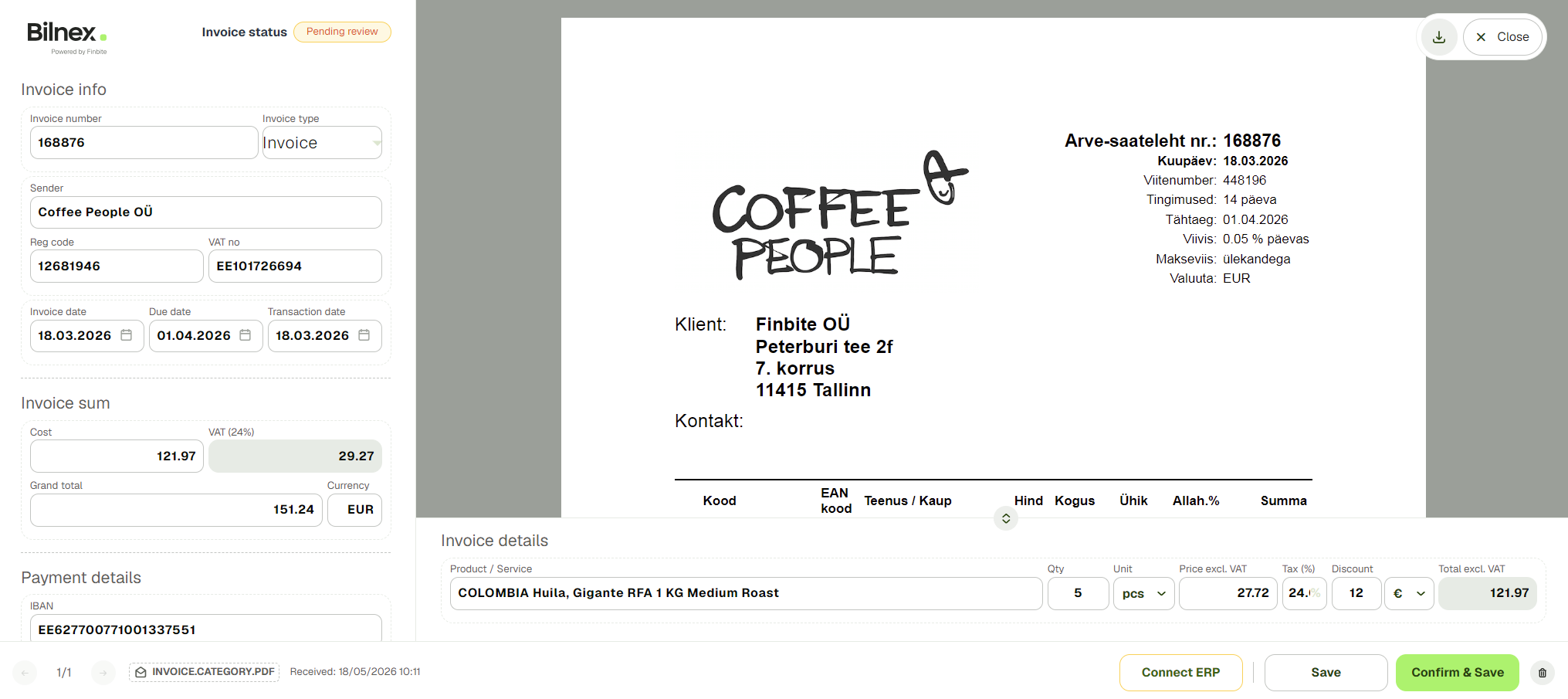
- Automatic detection: Artificial intelligence analyzes the file and fills in all mandatory fields (invoice number, dates, supplier details, amounts, VAT groups, payment information and IBAN) in seconds.
- Confirmation: You or your accountant will review the data on the screen, make any necessary corrections, and click “Confirm.” The confirmed invoice will immediately appear in your official list of purchase invoices, which you can send to Merit Software or export.
How to forward digitized invoices to accounting software (ERP)?
Confirmed purchase invoices do not simply remain in the Bilnex environment. If your company uses ERP software, the data is transferred there completely automatically thanks to our convenient direct connection - the accountant can see them immediately in his own program. If you use some business software that Bilnex does not have an interface with, you can conveniently export the digitized data from Bilnex in the universal Estonian e-invoice v1.2 or CSV format. If your program requires another specific format, please let our development team know at support@bilnex.io and we will find a solution.