
Peppol e-invoice and Peppol ID: Guide to international billing

In short (TL;DR)
Bilnex now has its own Peppol e-invoice solution! International invoicing doesn't have to mean sending PDFs as email attachments and waiting to see if it gets delivered or not. Peppol e-invoice is a global standard that takes your sales invoice directly into the foreign client's accounting software, regardless of what program they use in the other country. In Bilnex, opening a Peppol channel takes just a few clicks and the system automatically generates an official Peppol ID for you.
If your company provides services or sells goods to foreign partners, or if your suppliers are located in Europe, you have certainly come across the term Peppol. As the European Union moves ever faster towards mandatory B2B e-invoicing, Peppol has become the main bridge connecting the financial systems of different countries.
It is a secure international network designed to allow financial programs in different countries to exchange data without emails, attachments, or human intervention. On Bilnex, you can send and receive Peppol e-invoices for free.
What is Peppol ID?
The Peppol network does not use arbitrary email addresses to identify companies, but official ID codes.
Peppol ID is your company's unique digital address in the Peppol network. It is automatically generated based on your company's national registry code (e.g.: in Estonia, the interface 0191:register code). This code ensures that a customer in France, Germany or Finland can send you an e-invoice that will land unmistakably in your Bilnex account.
How does Peppol work? The four corners model
The usual way to send an invoice by email is a “two-corner model” – you send it, the customer receives it. It is insecure and creates unnecessary manual work. But Peppol works on the four-corner model (4-corner model), which resembles the way mobile operators work:
- First corner (You): You create an invoice in Bilnex.
- Second angle (Your operator – Bilnex): Bilnex checks that the invoice data meets international standards and sends it encrypted to the Peppol network.
- Third corner (Client operator): The foreign customer's e-invoice operator receives the data.
- Fourth corner (Your customer): The invoice appears directly in the client's accounting program.
This entire process is invisible to you – you simply press the “Send” button and the data is transferred securely.
Peppol for small businesses
Why should a micro or small business even bother opening a Peppol channel?
- Faster receipt of money: Many large foreign companies and government agencies simply reject PDF invoices or put them at the end of a long waiting list. Peppol e-invoices automatically go through the approval round, which speeds up payment receipt by up to a week.
- Security and fraud prevention: It is easy for cybercriminals to exploit PDF invoices sent via email and, for example, change the IBAN account number. This is impossible in the Peppol network, as all parties are validated and the network is encrypted.
- International legal compatibility: There are countries in Europe where e-invoices are already mandatory in public procurement and the B2B sector. Having a Peppol ID ensures that you are a reliable and technically mature cooperation partner for foreign partners.
Frequently asked questions: Sending and receiving Peppol e-invoices
How to open the Peppol e-invoice channel in Bilnex?
Activating a Peppol channel in the Bilnex environment takes just a few clicks. You can do this directly from your desktop or from the settings menu. The system automatically generates an official Peppol ID for your company. Once the channel is active, you are immediately ready to send and receive international e-invoices.
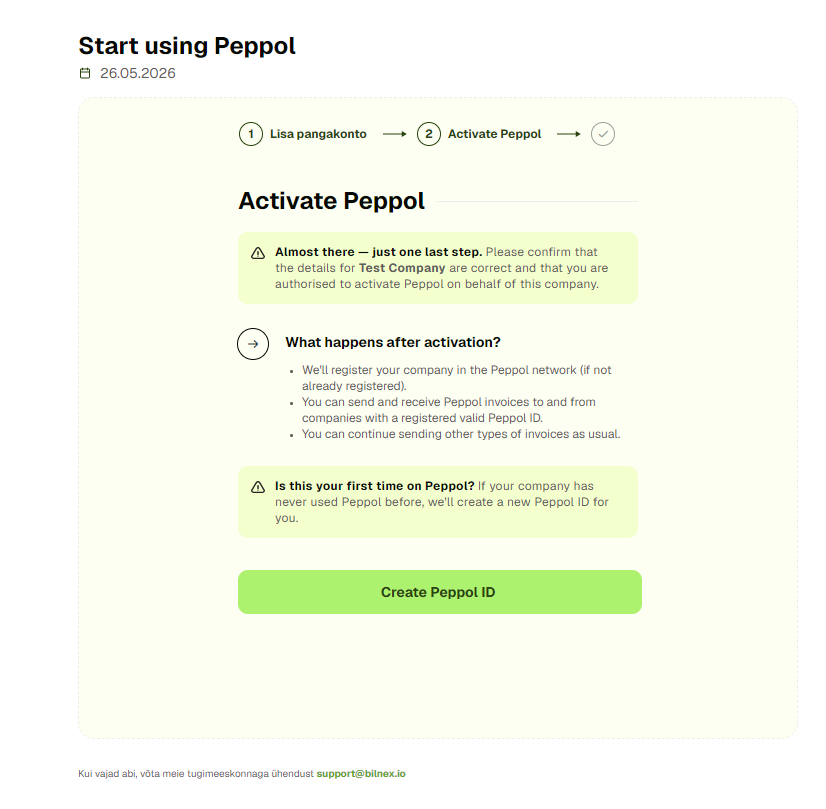
I already have a Peppol ID. What happens next?
It is currently not possible to transfer a Peppol ID to the Bilnex environment if it is already active with another operator. To open a new channel in Bilnex, you must first contact your previous service provider, ask them to release (delete) the existing Peppol ID, and then you can successfully activate it in the Bilnex environment.
How does Peppol send an invoice to a customer?
Start creating an invoice in Bilnex as usual and select Peppol as the format. As soon as you enter the recipient's company name or registry code, Bilnex automatically queries the pan-European registry and finds a partner in the Peppol network. Fill in the invoice lines and click "Send" - the invoice will arrive in the client's program code, without any emails or attachments.
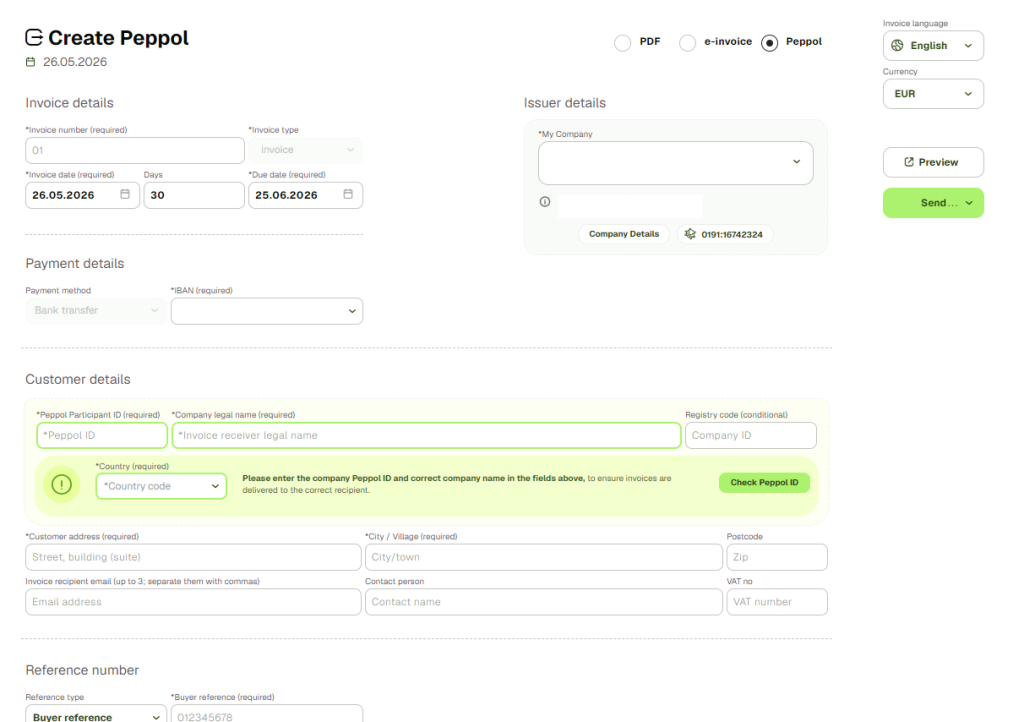
How are Peppol invoices received?
Once you have opened a Peppol channel in Bilnex, the reception is automatically active – you do not need to take any additional steps. All purchase invoices sent to your Peppol ID by foreign suppliers will appear in real time directly in your Bilnex purchase invoice list.